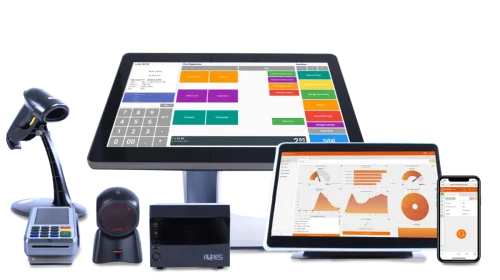
Businesses do not always operate with standard checkout setups. Retail stores, restaurants, warehouses, pharmacies, and specialty businesses can have different workspace layouts, transaction processes, peripheral requirements, and operational challenges. As a result, off-the-shelf POS equipment may not always provide the right combination of functionality and physical configuration.
A capable POS Hardware Manufacturer can support businesses by adapting hardware configurations to specific operational requirements. Customization may involve device design, connectivity, screen options, mounting arrangements, peripheral integration, or other technical considerations, allowing businesses to build checkout equipment around their existing workflows.
Why Custom POS Hardware Matters
Standard POS terminals are designed to meet common business needs, but some environments require more specialized solutions. Limited counter space, unusual installation requirements, or industry-specific peripherals can make a conventional setup less practical.
Custom hardware can address these challenges by focusing on the actual environment in which the equipment will be used. This approach can improve usability without requiring businesses to redesign their entire workspace.
Identifying Specific Equipment Requirements
The customization process generally begins by understanding what the business needs from its POS hardware. Important considerations can include transaction volume, available space, connected peripherals, user interaction, and installation conditions.
Businesses may also need to consider:
- Screen size and orientation
- Number and type of connection ports
- Mounting requirements
- Customer-facing displays
- Barcode scanning equipment
- Receipt or label printing
- Cash drawer integration
- Network connectivity
Clearly defining these requirements helps establish a practical hardware configuration.
Adapting the Physical Design
The physical design of a POS device can have a major impact on how effectively it fits into a business environment. A compact terminal may be appropriate for a small retail counter, while a larger operation may require a more extensive workstation.
Customization can involve enclosure dimensions, mounting options, display positioning, or the arrangement of connected components. These changes can help businesses make better use of their available workspace.
Supporting Different Display Configurations
Displays are one of the most visible parts of a POS system, and businesses may have different preferences depending on how transactions are handled.
Some environments may benefit from a standard horizontal display, while others may require a customer-facing screen or a particular viewing angle. Flexible display configurations can help employees and customers interact with the system more comfortably.
Integrating Required Peripherals
Custom POS equipment often needs to work with several peripheral devices. A business may already have specific scanners, printers, payment equipment, or cash management hardware that it wants to retain.
Manufacturers can consider these requirements when configuring the main terminal. Appropriate ports, mounting options, and compatibility considerations can make it easier to create a cohesive checkout station.
Designing for Space-Constrained Locations
Physical space can be a significant concern in modern checkout environments. Small shops, kiosks, service counters, and compact hospitality locations may have limited room for equipment.
A customized configuration can prioritize a smaller footprint while still supporting necessary functionality. Cable routing and mounting arrangements can also be considered to keep the workspace organized.
Addressing Industry-Specific Needs
Different industries can place different demands on POS hardware. Restaurants may need equipment that is easy to clean and positioned for fast order entry, while retail businesses may prioritize scanning and customer interaction.
Healthcare, transportation, entertainment, and other sectors may have their own operational requirements. Understanding the working environment allows hardware configurations to be better aligned with those specific demands.
Considering Connectivity Requirements
Connectivity is another area where customization can be useful. Businesses may require a particular combination of USB, Ethernet, serial, wireless, or other interfaces depending on their existing infrastructure.
Selecting the right connectivity options can help prevent unnecessary adapters and reduce complications when connecting multiple devices. It can also make future equipment additions easier to manage.
Balancing Customization With Reliability
Customization should not simply add features. Every modification needs to maintain the reliability and practicality expected from commercial POS equipment.
Manufacturers must consider component compatibility, thermal performance, structural integrity, power requirements, and long-term usage when developing customized configurations. A well-planned solution balances specialized requirements with dependable operation.
Evaluating Production and Quality Control
Custom equipment still needs consistent manufacturing standards. Once a particular configuration has been finalized, businesses deploying multiple units generally benefit from predictable specifications across their equipment.
Quality control procedures can help verify dimensions, components, connections, performance, and overall assembly. Consistency is especially important when customized devices are deployed across several stores or locations.
Planning for Future Changes
Business requirements can evolve after equipment has been installed. New peripherals may be introduced, transaction processes may change, or additional locations may require similar hardware.
For this reason, businesses should consider future requirements when discussing customization. Selecting flexible configurations and widely supported interfaces can make the equipment more adaptable over time.
Considering Service and Replacement Needs
Customized equipment should also be evaluated from a maintenance perspective. Businesses need to know how components can be serviced and whether replacement parts can remain available.
A practical customization strategy considers serviceability from the beginning. This can make troubleshooting and maintenance easier while helping businesses avoid unnecessary disruption to daily operations.
Choosing Custom Hardware Carefully
Customization can provide meaningful advantages, but businesses should avoid adding unnecessary complexity. The most useful solution is one that addresses genuine operational requirements while remaining reliable and manageable.
Before selecting a customized POS configuration, businesses should review the equipment’s compatibility, durability, connectivity, physical design, maintenance requirements, and potential for future expansion.
Conclusion
Custom POS hardware can help businesses address requirements that standard equipment may not fully accommodate. From physical dimensions and display arrangements to connectivity and peripheral integration, customization allows checkout equipment to better reflect the way a business operates.
The key is to approach customization as a practical design process rather than simply adding features. By clearly identifying operational needs and considering reliability, compatibility, serviceability, and future requirements, businesses can develop POS equipment that fits their environment while supporting efficient day-to-day operations.